
Download Write My PRD – AI‑Powered Product Requirement Document Writer
Overview
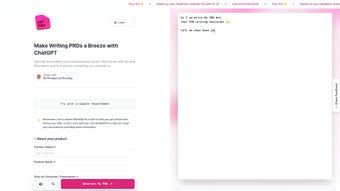
Write My PRD is a cutting‑edge AI writing assistant built on OpenAI’s ChatGPT model, purpose‑designed to simplify the creation of Product Requirement Documents (PRDs). Whether you’re a veteran product manager juggling multiple releases or a newcomer drafting your first roadmap, this tool guides you through every step of the PRD process with a conversational, human‑like interface. By prompting you for essential details—target audience, user stories, acceptance criteria, and timeline—Write My PRD automatically assembles a structured, professional‑grade document that can be exported directly to your team’s collaboration hub.
The platform also ships with a library of industry‑tested templates, ensuring you never start from a blank page again. While its current deployment is limited to Slack, the secure cloud‑based architecture guarantees that your data remains private and encrypted. In short, Write My PRD transforms a traditionally time‑consuming, error‑prone activity into a fast, repeatable, and collaborative experience.
Key Features
- ChatGPT‑Driven Content Generation: Leverages the latest language model to produce natural, coherent, and context‑aware PRD sections.
- Step‑by‑Step Guided Workflow: Interactive prompts walk users through market analysis, feature prioritization, and success metrics.
- Pre‑Built Templates: Access a curated set of PRD templates for SaaS, mobile apps, hardware, and enterprise solutions.
- Slack Integration: Initiate, edit, and retrieve PRDs directly from any Slack channel or DM, keeping the conversation within your existing workflow.
- Version History & Collaboration: Automatic saving of each iteration, allowing teams to comment, approve, and revert changes.
- Export Options: Generate documents in Markdown, PDF, or Google Docs format with a single click.
- Secure Cloud Storage: All data is encrypted at rest and in transit, complying with GDPR and SOC‑2 standards.
Installation, Usage & Compatibility
Getting started with Write My PRD is straightforward and requires no complex setup. Follow these steps to install and begin creating PRDs:
- Join the Slack Workspace: Visit the official Write My PRD website and click the “Add to Slack” button. You’ll be redirected to Slack’s OAuth page where you can authorize the app for your workspace.
- Configure Permissions: Grant the app permission to read and post messages, as well as access files for export purposes. The permission request is limited to what is necessary for PRD creation.
- Start a New Document: In any Slack channel, type
/writemprd start. The bot will initiate a conversational wizard, asking for product name, target market, and key stakeholders. - Answer Guided Prompts: Respond to each prompt with concise information. The AI will automatically flesh out sections such as problem statement, user personas, functional requirements, and success metrics.
- Review & Refine: Once the draft is complete, the bot presents a preview. You can request edits by referencing a section number, e.g., “Edit section 3 to include API rate limits.”
- Export & Share: Use the command
/writemprd export pdf(ormd/docx) to download the final PRD. The file can be uploaded back to Slack or saved to your preferred cloud storage.
Write My PRD is platform‑agnostic because it lives inside Slack, which is available on Windows, macOS, Linux, Android, and iOS. As long as you have a Slack client (desktop or mobile) and an internet connection, you can generate PRDs on the go.
Updates are delivered automatically through Slack’s app management system. When a new AI model or template library is released, the bot restarts with the latest capabilities—no manual patches required.
Pros & Cons
Pros
- Fast document generation saves up to 70% of drafting time.
- AI‑powered language ensures professional tone and consistency.
- Built‑in templates reduce the learning curve for new product managers.
- Slack‑first design fits naturally into existing communication workflows.
- Secure cloud storage meets enterprise compliance standards.
Cons
- Limited to Slack; teams using other chat platforms must adopt Slack or switch.
- Heavily reliant on the quality of user input; vague answers lead to generic sections.
- Lacks deep customization for industry‑specific compliance fields (e.g., FDA, ISO).
- No offline mode—requires constant internet connectivity.
- Free tier includes watermark on exported PDFs; premium plan needed for branding.
FAQ
Is Write My PRD truly free to use?
Write My PRD offers a free tier that includes unlimited PRD drafts, but exported PDFs carry a small watermark. To remove the watermark and access advanced templates, a paid “Pro” subscription is available at $9.99 per month.
Can I integrate Write My PRD with Confluence or Jira?
Direct integration is not built‑in yet, but you can export the PRD as Markdown or PDF and then attach it to Confluence pages or Jira tickets manually. Future updates plan to add native connectors.
How does the AI ensure data privacy?
All user inputs are encrypted both in transit (TLS 1.3) and at rest (AES‑256). Write My PRD does not store raw conversation logs beyond the session needed for document generation, complying with GDPR and SOC‑2.
What happens if I make a mistake in the wizard?
You can invoke the /writemprd undo command to revert the last change, or simply ask the bot to “edit section X” with the corrected information. The version history lets you roll back to any previous draft.
Is there a mobile‑friendly experience?
Yes. Because the app lives inside Slack, you can run the entire workflow from the Slack mobile app on iOS or Android, making it easy to capture ideas while traveling.
Conclusion & Call to Action
Write My PRD bridges the gap between strategic vision and detailed execution by turning conversational inputs into polished product requirement documents. Its AI core, template library, and seamless Slack integration make it a valuable addition to any product team’s toolkit, especially for those looking to accelerate documentation without sacrificing quality. While the Slack‑only access and limited customization may be a drawback for some enterprises, the overall value proposition—speed, consistency, and security—outweighs these constraints for most organizations.
Ready to streamline your product planning? Download Write My PRD now, start a free trial, and experience how AI can turn a chaotic brainstorm into a crystal‑clear PRD in minutes.



.png)



